
Maintaining a clean charging port is essential for the optimal performance of your phone. A dirty charging port can lead to slow charging, charging errors, and even complete charging failure. Dust, lint, and other debris can accumulate in the port over time, obstructing the connection between your phone and the charging cable. This comprehensive guide will provide you with safe and effective methods for cleaning your phone’s charging port, ensuring a reliable and efficient charging experience. Learning how to clean your phone’s charging port correctly can prevent costly repairs and extend the lifespan of your device.
This guide covers a range of cleaning methods, from using compressed air to carefully employing household tools. We will detail how to clean your phone’s charging port using each method, emphasizing the safety precautions you must take to avoid damaging your device. Whether you experience intermittent charging issues or simply want to perform routine maintenance, this guide provides the essential steps for cleaning your phone’s charging port and maintaining its optimal functionality. By following these instructions, you can ensure a consistently clean charging port for uninterrupted and efficient charging.
Why a Clean Charging Port Matters
A clean charging port is crucial for the optimal function and longevity of your smartphone. Dust, lint, and debris can accumulate in this small opening, creating a barrier that prevents a solid connection between your phone and the charging cable.
This obstruction can lead to several significant issues:
- Slow or Intermittent Charging: Debris can impede the flow of electricity, resulting in extended charging times or a charge that constantly starts and stops.
- Overheating: A poor connection can cause the charging port and surrounding components to overheat, potentially damaging your phone’s internal circuitry.
- Inability to Charge: In severe cases, a completely blocked port will prevent your phone from charging altogether.
- Damage to the Charging Cable: A dirty port can also damage the pins on your charging cable, leading to premature wear and tear.
Regularly cleaning your phone’s charging port is a simple preventative measure that can save you from these frustrating and potentially costly problems.
Signs Your Charging Port Needs Cleaning
A dirty charging port can manifest in several frustrating ways. Recognizing these signs early can prevent further issues and potentially save you from costly repairs.
One of the most common signs is that your phone doesn’t charge, or charges intermittently. You might plug it in, thinking it’s charging, only to find the battery level hasn’t increased or has even decreased. This is often due to debris blocking the connection between the charging cable and the port.
Another indicator is that your phone only charges at certain angles. If you have to wiggle the cable or hold your phone in a specific position to get it to charge, it’s a strong sign of a dirty port. The cable isn’t making proper contact because dust, lint, or other particles are obstructing the connection.
Lastly, be aware of any visible debris inside the port. If you can see dust, lint, or other particles accumulated in the charging port, it’s definitely time for a cleaning. Even if your phone is currently charging without issue, this buildup can eventually lead to problems.
What Not to Use: Avoiding Damage to Your Phone
Cleaning your phone’s charging port requires a gentle approach. Using the wrong tools or cleaners can cause irreparable damage to the delicate pins inside. Avoid the following items at all costs:
Compressed Air: While seemingly harmless, the force of compressed air can push debris further into the port and even damage internal components.
Metal Objects: Never insert metal objects like paperclips, needles, or safety pins into the charging port. These can scratch and bend the pins, leading to charging issues or a completely broken port.
Abrasive Cleaners: Harsh chemicals and abrasive cleaners can corrode the metal contacts within the charging port. Avoid using cleaning solutions, bleach, or other household cleaners.
Excessive Moisture: Liquids should be avoided. Even a small amount of moisture can cause corrosion or short circuits.
Gathering Your Supplies: What You’ll Need
Before you begin cleaning your phone’s charging port, gather a few essential supplies. Having everything ready will make the process smoother and more efficient.
You will need a clean, dry, and soft-bristled brush. A small, anti-static brush designed for electronics is ideal, but a new, unused toothbrush with soft bristles will also work. Avoid using brushes with metal bristles, as these can scratch and damage the delicate contacts inside the port.
A bright light source is also recommended. This will allow you to clearly see inside the charging port and identify any debris or obstructions.
Optionally, you can use a can of compressed air. If using compressed air, it is crucial to use it with extreme caution and hold the can upright to prevent liquid from entering your phone. Short bursts of air are recommended.
Step-by-Step Cleaning Instructions: A Safe and Effective Method
Power off your device. This is the most crucial step to prevent electrical shorts and damage to your phone.
Inspect the port. Shine a light into the charging port to get a clear view of any debris or lint buildup.
Begin cleaning. Gently insert the tip of your chosen cleaning tool (soft-bristled brush, toothpick, or compressed air) into the charging port.
Use a gentle motion. Avoid applying excessive force, which could damage the delicate connectors inside the port. If using a brush or toothpick, use a light, brushing motion to dislodge debris. If using compressed air, use short bursts aimed directly into the port.
Re-inspect and repeat. Check the port again with a light. Repeat the cleaning process if necessary until the port appears free of debris.
Test the connection. Once you are satisfied with the cleaning, plug in your charging cable to ensure a secure connection.
Testing the Port: Making Sure It’s Working Properly
Before attempting any cleaning, it’s crucial to test your charging port to determine if it’s truly malfunctioning. This helps avoid unnecessary cleaning and potential damage.
Firstly, try a different cable. A faulty cable can often mimic a dirty charging port. If the phone charges with a different cable, the issue lies with the cable and not the port.
Secondly, test with a different power source. Try plugging your phone into a wall outlet instead of a computer, or vice versa. This helps isolate whether the problem is with the power adapter or the port itself.
Finally, check the charging indicator. If your phone displays a charging symbol when plugged in, even if it’s charging slowly, the port is at least partially functional. A lack of any indicator suggests a more serious issue that cleaning might not resolve.
Preventing Future Buildup: Tips for Keeping Your Port Clean

Preventing debris buildup in your charging port is easier than cleaning it out. A few simple habits can significantly extend the life of your port and prevent charging issues.
Cover your port. When not in use, consider using a dust plug or case that covers the charging port. This simple barrier prevents lint, dust, and pocket debris from entering.
Keep your pockets clean. Regularly empty your pockets of lint, dirt, and other small particles. These are the primary culprits when it comes to charging port buildup.
Avoid charging in dusty environments. If possible, avoid plugging your phone in to charge in excessively dusty or dirty areas. This will minimize the amount of debris that can enter the port.
Be mindful of where you place your phone. Avoid placing your phone face down on dirty surfaces. This can push debris directly into the charging port.
Dealing with Persistent Problems: When to Seek Professional Help
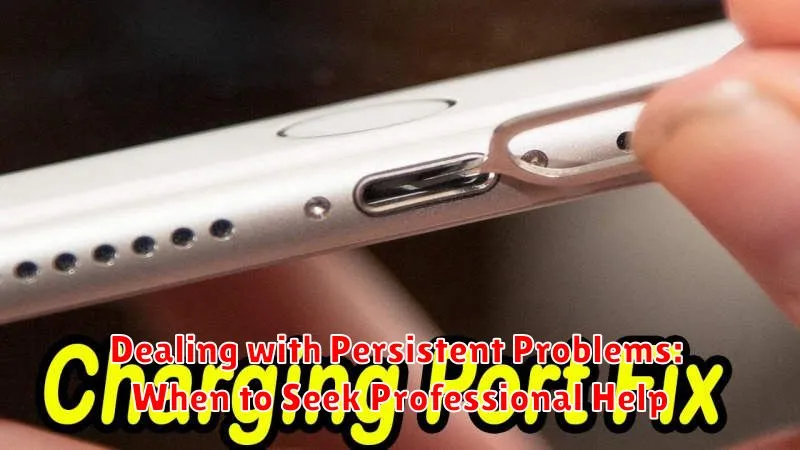
Sometimes, even after diligent cleaning, charging port issues persist. If you’ve tried the basic cleaning methods and your phone still isn’t charging reliably, it’s time to consider professional help. Continuing to use a faulty charging port can exacerbate the problem and potentially damage your phone further.
Signs you need professional help:
- Your phone only charges at certain angles.
- The charging cable feels loose or wobbly in the port.
- Your phone doesn’t recognize it’s charging, even with a known good cable and power adapter.
- You see visible damage inside the charging port, such as bent or broken pins.
- You smell a burning odor when plugging in your charger.
Where to seek help: Contact your phone’s manufacturer or a reputable phone repair specialist. They have the expertise and specialized tools to diagnose and fix complex charging port problems. Be sure to inquire about the cost of the repair and whether it’s covered under your phone’s warranty.
Advanced Cleaning Techniques: For Stubborn Debris (Proceed with Caution)
If the basic cleaning methods haven’t resolved your charging port issues, you might consider more advanced techniques. However, proceed with extreme caution as these methods carry a higher risk of damage if not performed correctly. Always remember that any damage caused by these methods is likely not covered under your phone’s warranty.
Compressed Air: A can of compressed air can be used to dislodge stubborn debris. Hold the can upright and a safe distance from the port. Use short bursts of air to avoid pushing debris further in or damaging internal components. Never insert the nozzle directly into the port.
Contact Cleaner: As a last resort, consider using specialized contact cleaner designed for electronics. Never use general purpose cleaners. Apply a minimal amount to a cotton swab and gently insert it into the port. Avoid excessive moisture. Let the port dry completely before attempting to charge your device.
Disclaimer: These advanced cleaning techniques should only be attempted if you are confident in your abilities and understand the risks involved. If you are unsure, it’s always best to seek professional help.
Understanding Your Phone’s Warranty: Coverage for Charging Port Issues
Before attempting any advanced cleaning methods, it’s crucial to understand your phone’s warranty coverage. Damage caused by improper cleaning may void your warranty.
Most manufacturers offer a limited warranty that covers defects in materials and workmanship. However, physical damage, including damage to the charging port caused by the user, is typically not covered.
Check your phone’s warranty documentation or the manufacturer’s website for specific details regarding your coverage. Look for information regarding:
- Warranty Period: How long is your phone covered?
- Coverage Details: What types of damage are covered and excluded?
- Accidental Damage Coverage: Do you have additional coverage for accidental damage?
If you’re unsure about your warranty coverage, contact your phone’s manufacturer or your mobile carrier for clarification. Attempting a repair yourself could void your warranty, so it’s always best to seek professional assistance if you’re unsure.
