
In today’s interconnected world, our smartphones serve as gateways to a vast amount of sensitive information. From personal contacts and financial details to private photos and confidential work emails, the data stored on our devices is invaluable. Protecting this information is paramount, and one of the most effective ways to bolster your phone’s security is by enabling two-factor authentication (2FA). Double the defense and significantly reduce the risk of unauthorized access by implementing this crucial security measure. This article will guide you through the process of setting up 2FA and explain the various methods available, ensuring that your valuable data remains safeguarded.
Two-factor authentication adds an extra layer of security beyond your standard password. While passwords can be guessed, stolen, or cracked, 2FA requires a second form of verification, making it exponentially more difficult for unauthorized individuals to gain access to your phone and its contents. Think of it as double the defense against cyber threats. This added security measure protects against various attack vectors, including phishing scams, malware, and brute-force attacks. Whether you use an Android or an iOS device, setting up 2FA is a simple yet powerful step you can take to secure your phone and protect your digital life.
Understanding Two-Factor Authentication
Two-factor authentication (2FA) adds an extra layer of security to your accounts, making it significantly harder for unauthorized access even if your password is compromised. It goes beyond the single factor of a password by requiring a second piece of information to verify your identity.
Think of it like a double lock on your front door. Your password is the first lock, but 2FA acts as the deadbolt, providing significantly greater protection. Even if someone manages to pick the first lock (your password), they’re still locked out without the key to the deadbolt (your second factor).
This second factor typically falls into one of a few categories:
- Something you know: A PIN, security question, or other piece of information.
- Something you have: A code from an authenticator app, SMS message, or security token.
- Something you are: Biometric authentication like fingerprint or facial recognition (often used in conjunction with a password or PIN).
By requiring two different types of verification, 2FA makes it exponentially more difficult for attackers to gain access to your accounts, safeguarding your personal information and preventing unauthorized activity.
Setting Up 2FA on Your Phone
Enabling 2FA typically involves a straightforward process within your phone’s settings. Most apps and online accounts offer 2FA as a security option.
Begin by locating the security or privacy settings within the app or account you wish to protect. Look for an option labeled “Two-Factor Authentication,” “2FA,” or “Two-Step Verification.” Once you’ve found it, select it to begin the setup process.
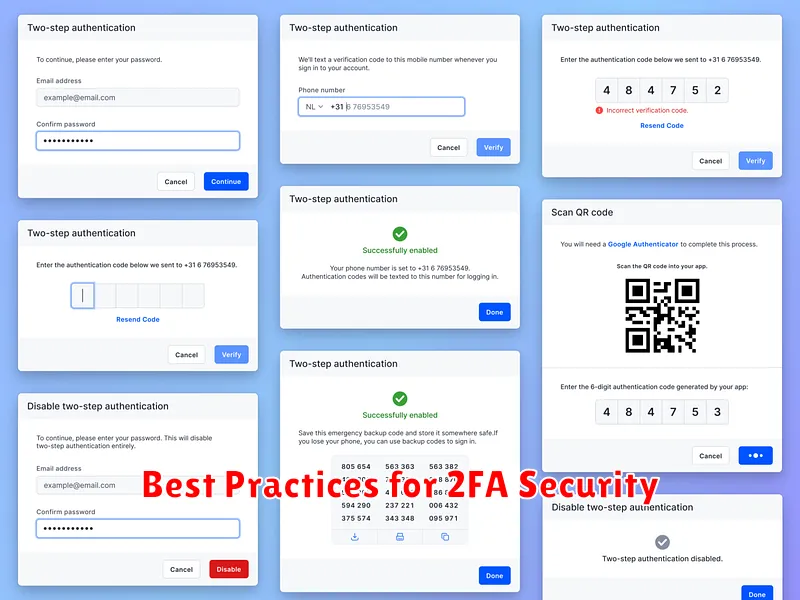
You will usually be presented with different 2FA methods to choose from, such as authenticator apps or SMS codes. The app or service will guide you through linking your chosen method to your account. This might involve scanning a QR code with an authenticator app or verifying a code sent via SMS.
It’s crucial to save any backup codes provided during setup. These codes are essential for regaining access to your account if you lose your primary 2FA device.
Choosing the Right 2FA Method
Selecting the most appropriate two-factor authentication method depends on your individual security needs and preferences. Several options exist, each with its own advantages and disadvantages.
Authenticator Apps: These apps generate time-based one-time passwords (TOTPs) and are considered highly secure. They offer a good balance of security and convenience. Popular choices include Google Authenticator, Authy, and Microsoft Authenticator.
SMS Codes: While convenient, SMS codes are generally considered the least secure option due to potential vulnerabilities like SIM swapping. However, they remain a viable option if other methods are unavailable.
Hardware Security Keys: These physical devices offer the strongest level of security. They require a physical connection to your device, making them resistant to phishing and other online attacks. Consider this option if you prioritize maximum protection.
Backup Codes: Regardless of your primary 2FA method, always generate and securely store backup codes. These codes provide access to your accounts if you lose your device or encounter issues with your primary 2FA method.
Managing Your 2FA Accounts
Effectively managing your two-factor authentication settings is crucial for maintaining strong security. This involves keeping track of your enrolled accounts and ensuring your recovery options are up-to-date.
Keep a Record: Maintain a list of all accounts where you’ve enabled 2FA. This record should specify the authentication method used for each account (e.g., authenticator app, SMS, security keys). A simple spreadsheet or a dedicated password manager can be helpful for this purpose.
Review Regularly: Periodically review your 2FA settings. Ensure the contact information associated with your accounts (e.g., phone number, email address) is current. If you change phone numbers or email addresses, update your 2FA settings immediately.
Recovery Options: Understand and utilize the recovery options provided for each 2FA method. Authenticator apps often provide backup codes or allow account synchronization. Familiarize yourself with these procedures to avoid being locked out of your accounts if your primary device is lost or stolen.
Troubleshooting 2FA Issues
Occasionally, you might encounter problems with two-factor authentication. This section addresses common issues and offers solutions.
Lost or Broken Device
Losing your phone or having it break can disrupt 2FA access. Backup codes are crucial in this situation. If you generated backup codes during setup, use one to log in and re-establish 2FA on your new device. If you didn’t create backups, contact the service provider’s support for assistance in regaining access.
Authenticator App Problems
If your authenticator app malfunctions, try reinstalling it. Ensure your device’s time is synchronized correctly, as time discrepancies can cause issues. If problems persist, you may need to contact the app’s support.
Receiving No Codes
If you’re not receiving SMS messages or email codes, check your phone’s signal strength or your spam folder. Ensure the correct phone number or email address is associated with your account. Contact your service provider if the problem continues.
Best Practices for 2FA Security
Implementing two-factor authentication significantly boosts your phone’s security. However, maximizing its effectiveness requires following some key practices. Choose strong and unique passwords for your accounts. A password manager can assist with this.
Be cautious of where you enable 2FA. Prioritize crucial accounts like email, banking, and social media. Consider the sensitivity of the information protected by each account.
Explore different 2FA methods. While SMS codes are common, authenticator apps offer enhanced security due to their offline nature. Hardware security keys provide the strongest protection.
Keep your recovery codes secure. These codes are your lifeline if you lose access to your primary authentication method. Store them offline in a safe place.
Regularly review your enrolled devices. Ensure only your trusted devices have access to your accounts. Remove any unrecognized or outdated devices promptly.
Benefits of Using Two-Factor Authentication

Two-factor authentication (2FA) significantly enhances the security of your phone and online accounts by adding an extra layer of protection beyond just your password. This added security measure offers several key benefits:
Stronger Security: 2FA makes it substantially more difficult for unauthorized individuals to access your accounts, even if they obtain your password. This added layer of defense helps protect against phishing attacks, keylogging, and other common password-based attacks.
Reduced Risk of Data Breaches: By requiring a second factor, 2FA minimizes the impact of data breaches. Even if a service you use is compromised, your accounts remain protected if you have 2FA enabled.
Increased Peace of Mind: Knowing your accounts have an additional layer of security provides greater peace of mind. You can feel more confident that your personal information, financial details, and online interactions are protected.
Improved Account Control: 2FA provides better oversight of account access. You’ll often receive notifications when someone attempts to log in, allowing you to quickly identify and respond to any suspicious activity.
